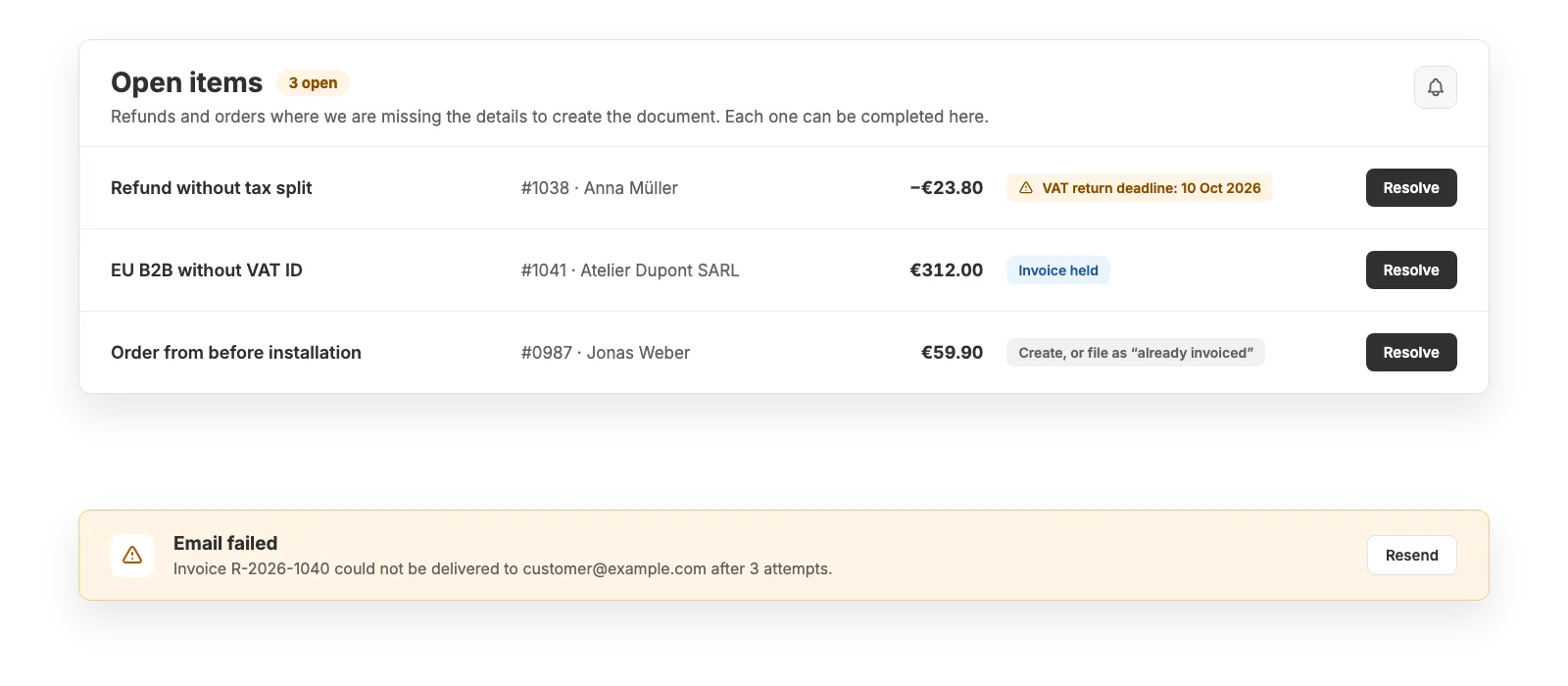
Automation is only a relief if it stops when in doubt instead of guessing. Tax shown too high is tax owed (§ 14c UStG) – so Easy Invoices puts the case to you and you decide.
“Open items” list in the dashboard: every entry describes what is missing and offers the path to the document
VAT-return deadlines shown right on the row
Notifications only on real consequence and concrete action – never in the middle of a retry
Which cases become open items
Every type has a clear resolution. There is no entry you could merely “acknowledge”.
Refund for an invoice from your previous system → enter original number, date and tax split, credit note is created
Refund with an amount only, no line items → confirm tax rates, VAT-return deadline is shown
Invoice creation failed for good → “Retry” from the stored order snapshot, no re-entry
Order from before installation, paid now → create the invoice here or file as “already invoiced elsewhere”
EU B2B without VAT ID → add the number or issue as a domestic invoice
Order without a recipient (manual draft, TikTok order above the small-amount limit) → enter the address or dismiss with a reason
Chargeback with an ambiguous correction → confirm the tax split, invoice correction is created
Tax question (border case, chain transaction, missing export evidence) → confirm once; the document is already issued
What keeps things from getting lost in the background
Shopify restricts access to older orders after roughly 60 to 90 days. The app does not depend on that.
Data is stored at the moment of detection – the item stays resolvable months later
Duplicate webhooks create no second entry; a double click creates no second document
Email delivery with up to three attempts, then a dashboard entry; the SMTP connection is monitored
Failures that only concern us (Shopify throttling, our infrastructure) go to our team – not to your dashboard
Good to know
While an item is open, its document is deliberately missing. Check the list in the rhythm of your VAT return – entries with a deadline show the date.
Chargebacks through PayPal, Klarna and other providers outside Shopify Payments are not reported to apps by Shopify. You record those manually.
Software, not tax advice: We are not tax advisers: Easy Invoices applies the rules you configure to your shop’s data – checking your documents for tax correctness stays with you and your accounting firm. Details in § 2a of the terms
Frequently asked questions
Why doesn’t the app just create the document in these cases?
Because it would have to guess the tax rate. A document showing too much tax obliges you to pay that tax (§ 14c UStG). A short question is the lesser evil compared to a wrong credit note.
How do I learn about an open item?
At the top of the dashboard, with amount and customer, plus on a dedicated page listing all items. If a case with a statutory deadline stays open, the app reminds you as well.
Strictly necessary cookies are always set. The three optional purposes below are set only with your consent — you can choose each one separately and change your decision at any time via “Cookie settings” in the footer. Details in our Privacy Policy
.
The optional purposes are: Statistics (Google Analytics 4, Google Ireland Limited), Marketing (Meta Pixel and Conversions API, Meta Platforms Ireland Limited) and Company identification (Pipedrive Web Visitors / Leadfeeder Oy, Finland — uses your IP address to determine which company is visiting us, and files it as a sales contact). “Adjust settings” lists exactly which data each one transmits.
For statistics and marketing, data may be transferred to the USA and combined there with data from other sources. Google and Meta are certified under the EU-US Data Privacy Framework; a level of protection equivalent to the EU still cannot be guaranteed. By making your selection you expressly consent to this transfer (Art. 49 (1) (a) GDPR). A withdrawal takes effect immediately, for the future.