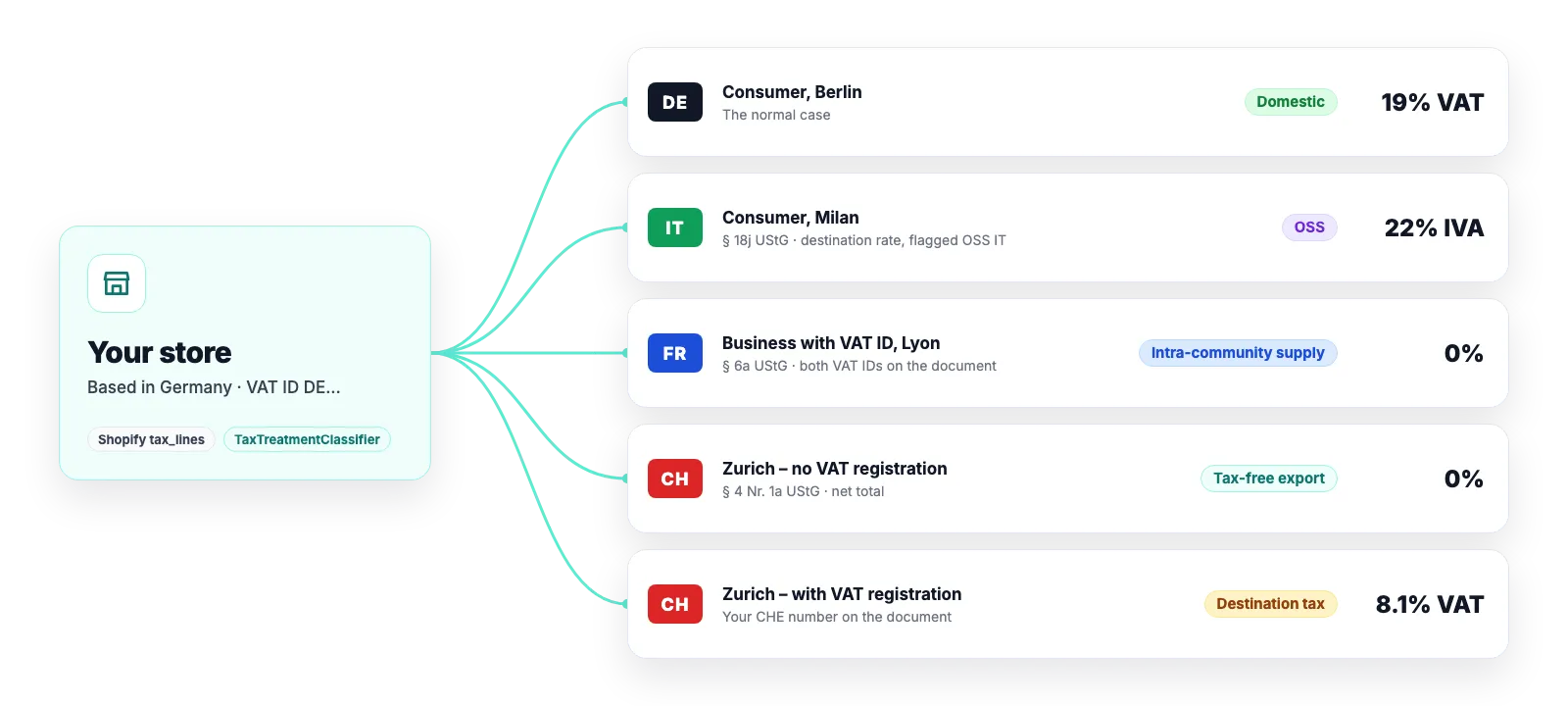
Above the €10,000 threshold you owe the destination country’s VAT on B2C deliveries to other EU states. Shopify calculates it – Easy Invoices recognises it, prints it correctly and flags the turnover so your accountant finds it ready for the OSS return.
Detected from Shopify’s tax lines: destination rate on a B2C delivery
Document shows rate, country and the OSS note
OSS turnover kept separate in the Z3 export and in the DATEV batch and CSV (closed beta)
What the app decides – and what you set once
Under Settings → Tax you record which EU countries you report through OSS. If one is missing, the app suggests it as soon as it finds destination tax on issued documents.
Delivery to a consumer in another EU country taxed at that country’s standard rate → OSS
Flagged as “OSS IT”, “OSS FR” and so on, on the document and in every report
Reduced rate in the destination: with the OSS registration set, the sale is still treated as OSS
Below the threshold (origin principle) it stays a domestic delivery with German VAT
How it interacts with the other rules
OSS is a question of geography and customer type. The app checks the other cases in a fixed order so nothing applies twice or wrongly.
B2B with a VAT ID is never OSS – it is an intra-community supply or reverse charge
Small business under § 19 UStG: tax genuinely owed in the destination is shown – § 19 yields
Tax a marketplace remits (channel liable) does not count towards the decision – except on TikTok: if TikTok marks the tax that way, it is still your OSS sale, because for a store based in the EU TikTok is not the deemed supplier
What the app deliberately does not do
Your accountant files the OSS return with the BZSt. Easy Invoices supplies the documents and reports they need for it.
Threshold monitoring and tax rates come from your Shopify tax settings. The app reads the tax lines, it does not recalculate them.
Software, not tax advice: We are not tax advisers: Easy Invoices applies the rules you configure to your shop’s data – checking your documents for tax correctness stays with you and your accounting firm. Details in § 2a of the terms
Frequently asked questions
How does the app know a sale falls under OSS?
From the combination of destination country, customer type and tax line: a B2C delivery to another EU country on which Shopify charged tax at the destination’s standard rate. With the OSS registration set, this also covers reduced rates.
How does OSS turnover reach my accountant?
In the DATEV batch on the OSS revenue account of your chart of accounts and in the CSV as a dedicated tax-treatment column – both exports are in the closed beta – and in the Z3 export as a field per document. The PDF archive contains the documents with the note.
Strictly necessary cookies are always set. The three optional purposes below are set only with your consent — you can choose each one separately and change your decision at any time via “Cookie settings” in the footer. Details in our Privacy Policy
.
The optional purposes are: Statistics (Google Analytics 4, Google Ireland Limited), Marketing (Meta Pixel and Conversions API, Meta Platforms Ireland Limited) and Company identification (Pipedrive Web Visitors / Leadfeeder Oy, Finland — uses your IP address to determine which company is visiting us, and files it as a sales contact). “Adjust settings” lists exactly which data each one transmits.
For statistics and marketing, data may be transferred to the USA and combined there with data from other sources. Google and Meta are certified under the EU-US Data Privacy Framework; a level of protection equivalent to the EU still cannot be guaranteed. By making your selection you expressly consent to this transfer (Art. 49 (1) (a) GDPR). A withdrawal takes effect immediately, for the future.