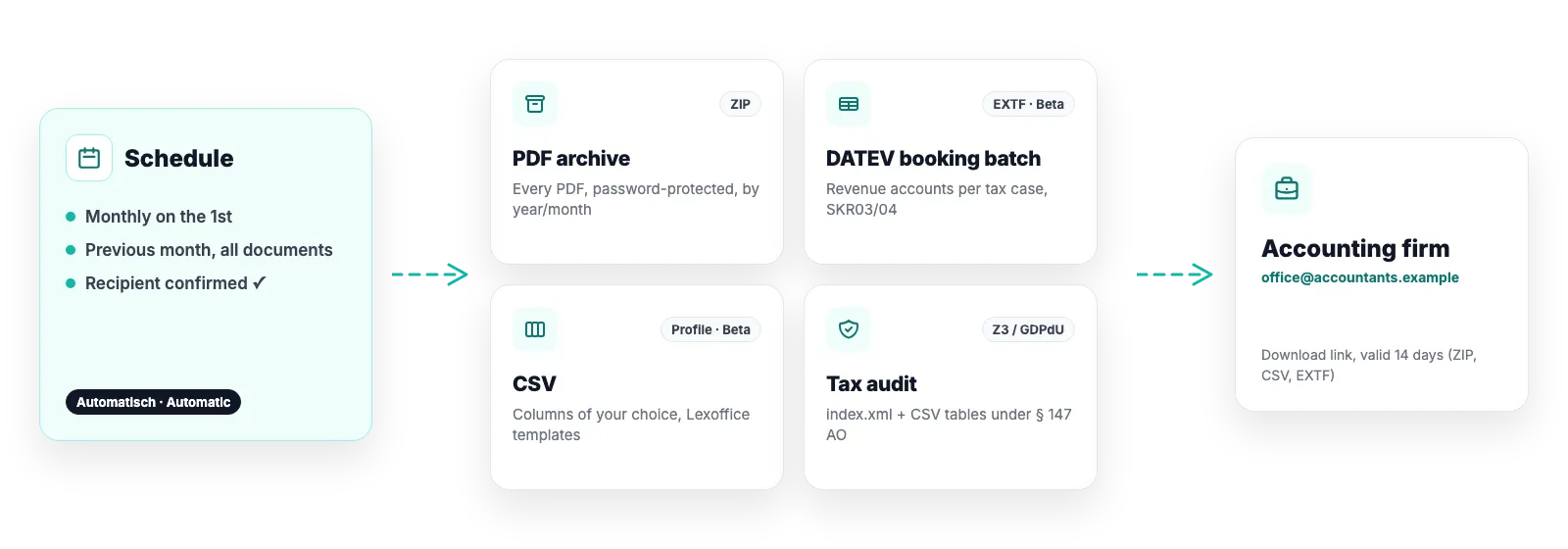
Not a column look-alike but the file DATEV Kanzlei-Rechnungswesen imports: format category 21, 125 columns, cp1252, one booking per document and tax rate. On request the batch carries the settlement of each receivable beside the receivable itself – both lines with the same document number, so DATEV closes the open item itself. Accounts are prefilled; your accounting firm can adjust them.
Optional payment clearing: the collective debtor nets to zero per transaction instead of 400 open items
Optional document images as a ZIP with document.xml – every booking links to its PDF
Invite your accountant by link: configure accounts without Shopify access
Closed beta: DATEV export (EXTF) is built and tested but unlocked for selected shops only so far. Access is available on request via support; every other capability is open to every shop.
What the batch contains
Every document carries its tax treatment frozen inside it. The account is therefore a lookup, not a rule engine – a booking can never contradict the document.
Debtor to revenue account, one entry per document and tax rate; credit notes and cancellations with reversed sign
Chart of accounts SKR03 or SKR04, prefilled from published sample charts, every account editable
Optional collective debtor per payment method so the firm clears per provider instead of per order
Document field 1 = invoice number, document link with a stable GUID – a re-export creates no duplicates in DATEV Unternehmen online
The accounting firm configures it themselves
Instead of handing out Shopify access you invite your accountant by email. In the accountant portal the firm enters accounts and the desired cadence – and adjusts them any time later, without a new invitation.
The link in the invitation works once; after that the firm signs in any time with their email address and a one-time code
While the firm has access every DATEV field is locked on your side – no two-person conflict. You block the access whenever you want
On completion the firm sets destination address and cadence; the scheduled DATEV export is created automatically
Pre-flight checklist before every export: missing accounts, unbookable cases and their documents are named
How the batch reaches the firm
1
Set up accounts
You or your firm review the defaults under Settings → Export formats → DATEV.
2
Create a schedule
Monthly, quarterly or yearly, to a confirmed email address. One-off exports for any period are available any time.
3
Import
The firm receives a download link (valid 14 days) and imports the batch – with PDF links when document images are included.
What the export deliberately is not
Not a DATEV integration: there is no API connection to DATEV. You hand over a file – via email link or DATEV Belegtransfer.
Revenue bookings only: payments, payouts, payment-provider fees and transfers are not in the batch. The app does not hold that data.
Not a Z3/GoBD data carrier: for a tax audit there is the separate GDPdU export.
The default accounts come from sample charts, not from an accounting firm – review them with your accountant. § 25a is handed over gross; the firm determines the margin.
Software, not tax advice: We are not tax advisers: Easy Invoices applies the rules you configure to your shop’s data – checking your documents for tax correctness stays with you and your accounting firm. Details in § 2a of the terms
Frequently asked questions
Can my accounting firm really import the file without rework?
The file is a regular EXTF booking batch (format version 13) and is tested against a reference file from DATEV. What the firm should review are the prefilled revenue accounts – that is exactly what the invite is for.
What about payments and PayPal fees?
Not in the batch. We book the revenue; payouts and fees come from your payment providers’ reports. The optional collective debtor per payment method makes clearing easier for the firm.
What if a document has no account assigned?
The pre-flight checklist names every affected document and the missing case. Three cases deliberately have no default (e.g. destination tax) because no universally valid account exists – the firm decides.
Strictly necessary cookies are always set. The three optional purposes below are set only with your consent — you can choose each one separately and change your decision at any time via “Cookie settings” in the footer. Details in our Privacy Policy
.
The optional purposes are: Statistics (Google Analytics 4, Google Ireland Limited), Marketing (Meta Pixel and Conversions API, Meta Platforms Ireland Limited) and Company identification (Pipedrive Web Visitors / Leadfeeder Oy, Finland — uses your IP address to determine which company is visiting us, and files it as a sales contact). “Adjust settings” lists exactly which data each one transmits.
For statistics and marketing, data may be transferred to the USA and combined there with data from other sources. Google and Meta are certified under the EU-US Data Privacy Framework; a level of protection equivalent to the EU still cannot be guaranteed. By making your selection you expressly consent to this transfer (Art. 49 (1) (a) GDPR). A withdrawal takes effect immediately, for the future.