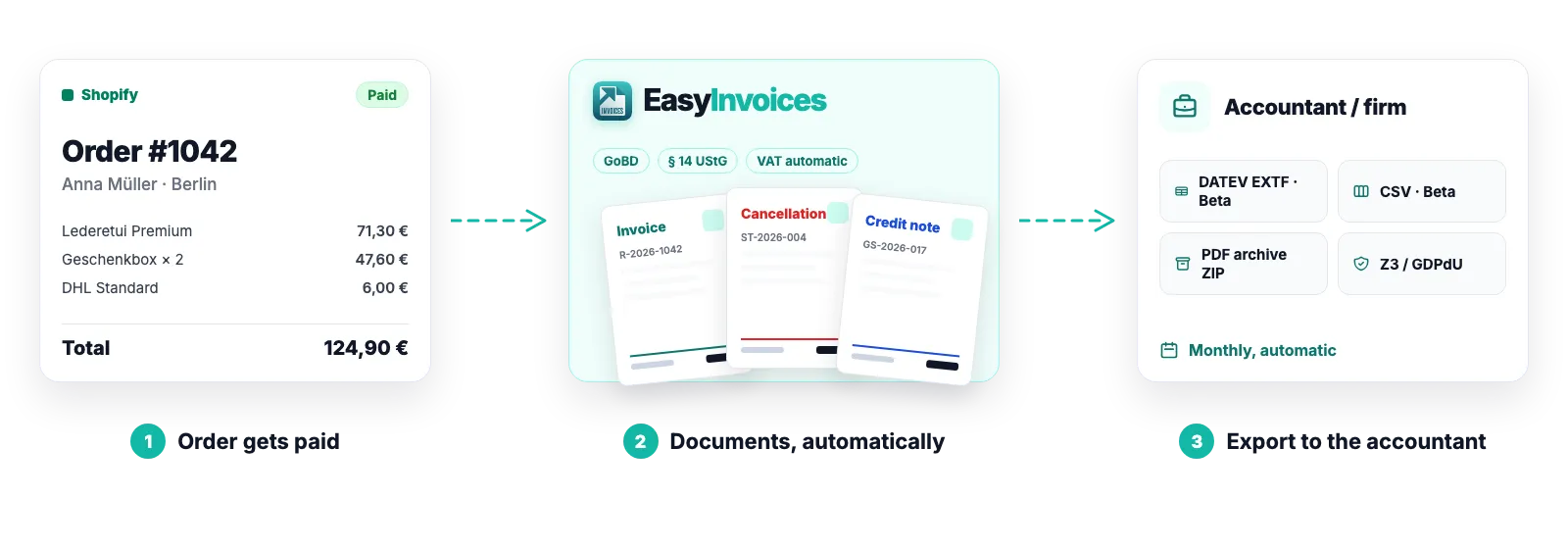
Automatic invoices, cancellations & credit notes for Shopify
The moment Shopify reports an order as paid, Easy Invoices creates the invoice, attaches it to the customer email and files it tamper-proof. If the order changes, the matching correction document follows – automatically.
Triggered by payment – including bank transfer
Cancellation and credit note referencing the original invoice
Gap-free numbering with a separate sequence for credit notes
What happens on which event
Every document has exactly one trigger in Shopify. No event produces two documents – and where a detail is missing, an open item appears instead of a guessed document.
Order paid → invoice (PDF) is created and emailed
Order cancelled → cancellation invoice referencing the original
Refund (full or partial) → credit note with its own number, linked to the invoice
Invoice-relevant edit (address, line items, tax rate) → cancellation of the old invoice plus a corrected one
Shopify Payments chargeback → invoice correction under § 17 UStG
Numbering a tax auditor can follow
You set prefix, start number and an optional year once. From then on an atomic counter issues every number exactly once.
Invoice number independent of the Shopify order number; both are printed
Separate sequence for credit notes (e.g. CN-2026-001)
Your sequence continues from your previous system instead of restarting at 1
Settings lock after the first invoice, which is what keeps the series gap-free
Your branding, every mandatory field
The PDF template carries your logo, accent colour and font. The mandatory fields under § 14 UStG are set by the app.
Logo, colour, one of 13 fonts, intro and footer text, SKU column on or off
Company data, tax number, VAT ID and bank details on every document
Invoice and email in the customer’s language (German or English)
Foreign currency: amounts in shop currency plus the total in customer currency with the exchange rate
How it works
1
Payment arrives
Shopify sends the webhook with line items, tax rates and customer data.
2
Document is created
The app determines the tax treatment, issues the number and renders the PDF.
3
Sent & archived
The customer receives the document by email. The PDF is stored encrypted and immutable.
Good to know
Orders placed before installation are not invoiced retroactively. If such an order is paid later, the app asks you first – see error handling.
In-person sales through Shopify POS are deliberately not invoiced: the customer already received the POS receipt at the till, and Shopify does not reliably deliver all invoice data for those sales. Every other order in the store is processed as usual.
TikTok Shop orders reach Shopify without a buyer name. Up to €250 (seller in Germany) or €400 (seller in Austria) a small-amount invoice is issued automatically; above that the app asks you for the recipient – see TikTok Shop orders.
Software, not tax advice: We are not tax advisers: Easy Invoices applies the rules you configure to your shop’s data – checking your documents for tax correctness stays with you and your accounting firm. Details in § 2a of the terms
Frequently asked questions
When exactly is the invoice created?
On payment, not on fulfilment. A bank-transfer order only receives its invoice once Shopify marks it as paid – so no document is issued for money that never arrives.
Can I switch off automatic sending to customers?
Yes. Under Settings → Advanced you disable sending. Documents are still created and can be sent manually from the document list or straight from the Shopify order.
What happens when an address changes after invoicing?
An invoice is never overwritten. The app cancels the old invoice and issues a corrected one – both stay in the system, as GoBD and § 14 UStG require.
Strictly necessary cookies are always set. The three optional purposes below are set only with your consent — you can choose each one separately and change your decision at any time via “Cookie settings” in the footer. Details in our Privacy Policy
.
The optional purposes are: Statistics (Google Analytics 4, Google Ireland Limited), Marketing (Meta Pixel and Conversions API, Meta Platforms Ireland Limited) and Company identification (Pipedrive Web Visitors / Leadfeeder Oy, Finland — uses your IP address to determine which company is visiting us, and files it as a sales contact). “Adjust settings” lists exactly which data each one transmits.
For statistics and marketing, data may be transferred to the USA and combined there with data from other sources. Google and Meta are certified under the EU-US Data Privacy Framework; a level of protection equivalent to the EU still cannot be guaranteed. By making your selection you expressly consent to this transfer (Art. 49 (1) (a) GDPR). A withdrawal takes effect immediately, for the future.