TikTok Shop on Shopify: invoices even when TikTok withholds the buyer
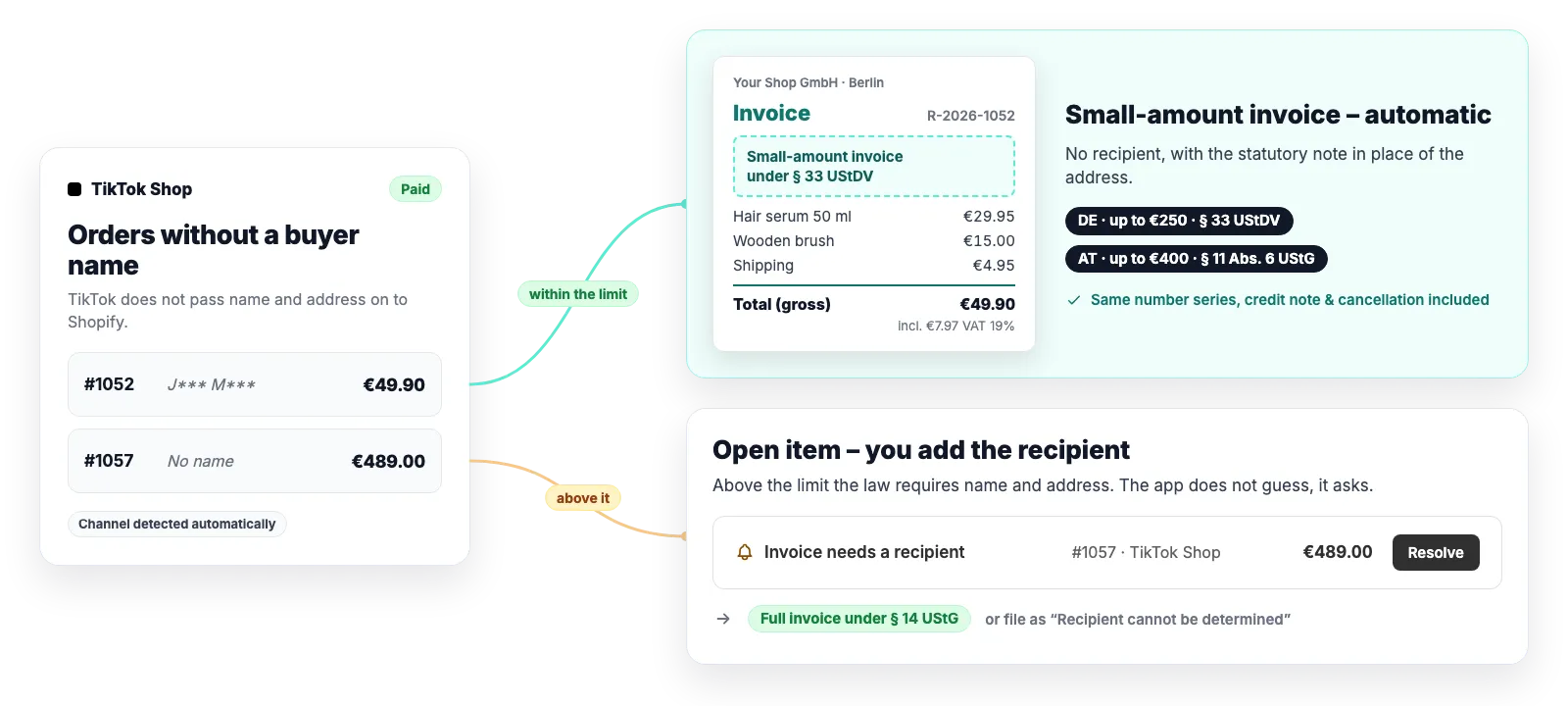
TikTok Shop hands orders to Shopify without the buyer’s name and address – so no § 14 UStG invoice can be issued for them. For small amounts the law allows an invoice without a recipient. Easy Invoices issues it automatically where it is allowed and asks you where it is not.
Seller in Germany: a small-amount invoice under § 33 UStDV up to €250 gross – no clicks
Seller in Austria: up to €400 gross under § 11 Abs. 6 UStG, with no limit for small businesses
Above that, an open item where you add the recipient – never a document with an invented name
Why TikTok orders need a rule of their own
For privacy reasons TikTok does not pass the buyer on to Shopify. Depending on the shipping mode an order arrives without a billing address, with a masked name (“J*** M***”) or – when you ship yourself – complete. The app tells these cases apart instead of printing a placeholder on the invoice.
The order is recognised by the official TikTok app in Shopify, not by tags anyone can edit
Masked names and placeholders such as “TikTok Order” count as no recipient – they never reach a document
If the buyer arrives complete, an ordinary § 14 UStG invoice is issued
Recipient-less orders from other channels, such as a manual draft, still ask for the address
What the small-amount invoice shows
The statutory note takes the place of the address. Everything else § 33 UStDV or § 11 Abs. 6 UStG requires is printed as usual – plus a little more than the law asks for.
The note “Kleinbetragsrechnung gemäß § 33 UStDV” or “… gemäß § 11 Abs. 6 UStG”, depending on where your store is based
Your business with its address, invoice and supply date, quantity and type of goods
Gross amount and tax rate per line, split by rate where several apply
A number from your normal gap-free sequence – no second series
Credit notes and cancellations of a small-amount invoice keep its form and note
No ZUGFeRD XML, because EN 16931 requires a buyer: § 33 UStDV expressly allows a plain PDF, and Austria has no B2C e-invoicing mandate
When the app asks instead
Where a small-amount invoice is not allowed, the law requires the recipient’s name and address. The app then holds the invoice and opens the item “Invoice needs a recipient” – with order, amount and an entry form.
More than €250 (DE) or €400 (AT) gross – shipping included, tips not
OSS sale with destination VAT, intra-community supply or reverse charge: the law excludes the small-amount invoice there
Store in Austria and the goods leave Austria: a cautious reading of the distance-selling exclusion (UStR 2000 Rz 1625)
Order not in euros, or your store is based in neither Germany nor Austria
You enter name or company and address → full § 14 UStG invoice. If the recipient cannot be determined, you dismiss the item with a reason
If an order is refunded while its item is still open, the app remembers the refund and puts it to you for review once the invoice exists
How it works
1
A TikTok order is paid
Shopify reports the order. The app recognises the TikTok channel and checks whether a genuine recipient came with it.
2
Limit and tax case checked
Gross within your country’s limit and a permitted tax case? Then the small-amount invoice is issued.
3
Document or question
The invoice flows into your archive and exports like any other. Otherwise an open item waits for you.
Good to know
You owe the invoice as the seller, not TikTok: for a store based in Germany or Austria the platform is not the deemed supplier under § 3 Abs. 3a UStG. If TikTok marks the tax as “remitted by the channel”, that changes nothing – the invoice shows the full VAT. If TikTok acts as the seller itself, the order is held for review.
The app treats every TikTok order as shipped from your store’s country. If you ship from a warehouse outside the EU, for example by dropshipping, TikTok may owe the tax on consignments up to €150 – the app does not check this. Clarify that case with your accountant.
For your bookkeeping: in the DATEV export the app books the revenue and – if switched on – the payment settlement to the TikTok clearing account. The payout, TikTok’s fees and discounts funded by TikTok are on TikTok’s settlement statement; your accountant reconciles the clearing account against it.
The official TikTok app in Shopify is supported. Orders through third-party connectors carry a different identifier and are not recognised as TikTok orders – the app processes them like any other order, with whatever details the connector passes to Shopify.
Small-amount invoices are available for stores based in Germany and Austria. Other countries’ rules are not implemented – there the app keeps asking.
If an order later changes so that the small-amount invoice is no longer allowed (for example above the limit), the app does not correct it automatically but notifies you.
Software, not tax advice: We are not tax advisers: Easy Invoices applies the rules you configure to your shop’s data – checking your documents for tax correctness stays with you and your accounting firm. Details in § 2a of the terms
Frequently asked questions
Is an invoice without the buyer’s name even allowed?
Yes, up to €250 gross. For a small-amount invoice, § 33 UStDV requires neither the recipient’s name nor their address – only your details, the date, quantity and type of goods, the gross amount and the tax rate. In Austria the same applies under § 11 Abs. 6 UStG up to €400, with no limit for small businesses.
Do I need to set anything up?
No, there is no switch. The app decides for every TikTok order from the amount, the tax case and the country in your company details. All that matters is that country and tax scheme are right in the settings.
What do I do with a TikTok order above the limit?
It appears under “Open items” as “Invoice needs a recipient”. If you know the buyer – say they emailed you their billing address – you enter name or company and address, and the app issues the full invoice. Otherwise you dismiss the item with the reason “Recipient cannot be determined”: no document is issued on purpose, and the reason stays on record for an audit.
What does my accountant see?
An ordinary numbered document: the small-amount invoice is in the PDF archive and the Z3 export, and in the DATEV booking batch (closed beta) it is booked through the collective debtor as “Sammelkunde”. A masked name such as “J*** M***” never reaches an export.
Strictly necessary cookies are always set. The three optional purposes below are set only with your consent — you can choose each one separately and change your decision at any time via “Cookie settings” in the footer. Details in our Privacy Policy
.
The optional purposes are: Statistics (Google Analytics 4, Google Ireland Limited), Marketing (Meta Pixel and Conversions API, Meta Platforms Ireland Limited) and Company identification (Pipedrive Web Visitors / Leadfeeder Oy, Finland — uses your IP address to determine which company is visiting us, and files it as a sales contact). “Adjust settings” lists exactly which data each one transmits.
For statistics and marketing, data may be transferred to the USA and combined there with data from other sources. Google and Meta are certified under the EU-US Data Privacy Framework; a level of protection equivalent to the EU still cannot be guaranteed. By making your selection you expressly consent to this transfer (Art. 49 (1) (a) GDPR). A withdrawal takes effect immediately, for the future.